Grafana CLI を使って特定のアラートをミュートにする

こんなファイルを置く
$ cat ~/.grafana/prd

[ENVIRONMENT]
export GF_ENV="prd"
export GF_API_URL='https://grafana/api'
export GF_AUTH_HEADER="Authorization: Bearer $GF_TOKEN"

[main]
export GF_TOKEN=""
プロジェクトを設定する
source grafana-cli config set-env prd <org_name>
叩けるか確認
$ grafana-cli alerts

ALERT_ID    ALERT_STATE    DASHBOARD                                                   ALERT_NAME
===========================================================================================================================================================
10          ok           temperature                                               CPU Temperature Alert
38          ok           nomad                                                     CPU Usage alert
30          ok           network                                                   CPU alert
17          ok           alerts                                                    Free disk space (ext4) alert
18          ok           alerts                                                    Free disk space (xfs) alert
6           ok           proxmox-via-prometheus                                    Guests CPU usage alert
5           ok           proxmox-via-prometheus                                    Guests Disk usage alert
24          ok           proxmox-via-prometheus                                    Guests memory usage alert
43          paused       alerts                                                    IO Wait
37          ok           nomad                                                     Job Status alert
39          ok           nomad                                                     Memory Usage alert
49          ok           nicehash                                                  NiceHash GPU Load alert
48          alerting     nicehash                                                  NiceHash GPU Temperature alert
47          ok           alerts                                                    Nicehash Active Device alert
44          ok           temperature                                               Nicehash GPU Temperature alert
26          ok           alerts                                                    Ping Alert
41          ok           temperature                                               Proxmox3 Storage alert
34          ok           network                                                   RAM Free alert
13          ok           temperature                                               Storage Temperature alert
11          ok           temperature                                               Storage alert
12          ok           temperature                                               Storage alert
45          ok           xfs-fragmentation                                         XFS Fragmentation in Percent alert
19          ok           alerts                                                    mdadm alert
16          ok           alerts                                                    memory alert
40          ok           alerts                                                    minio alert
15          ok           alerts                                                    mysqld
46          ok           alerts                                                    mysqlrouter process alert
32          ok           alerts                                                    nginx alert
27          ok           alerts                                                    redis proccess alert
28          ok           alerts                                                    redis sentinel alert
33          ok           alerts                                                    samba alert
42          ok           alerts                                                    samba alert
21          ok           alerts                                                    sshd alert
特定のアラートをミュートする
$ grafana-cli alerts pause -i 48
何ヶ月ぶりの記事だろうか。 最近はここで記事を書いてます。
CentOS の GPT で、XFS なルートボリュームを拡張する
ディスクは 160GB なのに 8GB しか使われてないとき、ルートボリュームを拡張したい
NAME        MAJ:MIN RM  SIZE RO TYPE MOUNTPOINT
nvme0n1     259:0    0  160G  0 disk
├─nvme0n1p1 259:1    0  200M  0 part /boot/efi
└─nvme0n1p2 259:2    0  7.8G  0 part /
GPT なら入れておく
# yum install gdisk
パーティションの拡張
# growpart /dev/nvme0n1 2
# xfs_growfs /
確認
NAME        MAJ:MIN RM   SIZE RO TYPE MOUNTPOINT
nvme0n1     259:0    0   160G  0 disk
├─nvme0n1p1 259:1    0   200M  0 part /boot/efi
└─nvme0n1p2 259:2    0 159.8G  0 part /
InnoDB Cluster で過去のバイナリログが存在しない状況での復旧方法 missing transactions that were purged from all cluster members. (RuntimeError)
既存のクラスターのどれか一つに入る
 MySQL  db02.luis.local:33060+ ssl  JS > \c root@db01.luis.local
Creating a session to 'root@db01.luis.local'
Fetching schema names for autocompletion... Press ^C to stop.
Closing old connection...
Your MySQL connection id is 2145 (X protocol)
Server version: 8.0.23 MySQL Community Server - GPL
No default schema selected; type \use <schema> to set one.
 MySQL  db01.luis.local:33060+ ssl  JS > c = dba.getCluster()
<Cluster:main>
 MySQL  db01.luis.local:33060+ ssl  JS > c.status()
{
    "clusterName": "main",
    "defaultReplicaSet": {
        "name": "default",
        "primary": "db03.luis.local:3306",
        "ssl": "REQUIRED",
        "status": "OK_NO_TOLERANCE",
        "statusText": "Cluster is NOT tolerant to any failures. 1 member is not active.",
        "topology": {
            "db01.luis.local:3306": {
                "address": "db01.luis.local:3306",
                "mode": "R/O",
                "readReplicas": {},
                "replicationLag": null,
                "role": "HA",
                "status": "ONLINE",
                "version": "8.0.23"
            },
            "db02.luis.local:3306": {
                "address": "db02.luis.local:3306",
                "instanceErrors": [
                    "WARNING: Instance is NOT a PRIMARY but super_read_only option is OFF.",
                    "WARNING: server_uuid for instance has changed from its last known value. Use cluster.rescan() to update the metadata."
                ],
                "mode": "R/W",
                "readReplicas": {},
                "role": "HA",
                "status": "(MISSING)",
                "version": "8.0.23"
            },
            "db03.luis.local:3306": {
                "address": "db03.luis.local:3306",
                "mode": "R/W",
                "readReplicas": {},
                "replicationLag": null,
                "role": "HA",
                "status": "ONLINE",
                "version": "8.0.23"
            }
        },
        "topologyMode": "Single-Primary"
    },
    "groupInformationSourceMember": "db03.luis.local:3306"
}
db02 を rejoin しても過去のバイナリログがないためリカバリができない
 MySQL  db01.luis.local:33060+ ssl  JS > c.rejoinInstance('root@db02.luis.local')

ERROR: A GTID set check of the MySQL instance at 'db02.luis.local:3306' determined that it is missing transactions that were purged from all cluster members.

Cluster.rejoinInstance: The instance 'db02.luis.local:3306' is missing transactions that were purged from all cluster members. (RuntimeError)
db02 をクラスターから外す force: true
 MySQL  db01.luis.local:33060+ ssl  JS > c.removeInstance('root@db02.luis.local', {force: true})
NOTE: db02.luis.local:3306 is reachable but has state OFFLINE
The instance will be removed from the InnoDB cluster. Depending on the instance
being the Seed or not, the Metadata session might become invalid. If so, please
start a new session to the Metadata Storage R/W instance.

NOTE: The recovery user name for instance 'db02.luis.local:3306' does not match the expected format for users created automatically by InnoDB Cluster. Skipping its removal.
NOTE: Transaction sync was skipped
NOTE: The instance 'db02.luis.local:3306' is OFFLINE, Group Replication stop skipped.
ERROR: Instance 'db02.luis.local:3306' failed to leave the cluster: db02.luis.local:3306: Slave channel 'group_replication_applier' does not exist.

The instance 'db02.luis.local:3306' was successfully removed from the cluster.

 MySQL  db01.luis.local:33060+ ssl  JS > c.status()
{
    "clusterName": "main",
    "defaultReplicaSet": {
        "name": "default",
        "primary": "db03.luis.local:3306",
        "ssl": "REQUIRED",
        "status": "OK_NO_TOLERANCE",
        "statusText": "Cluster is NOT tolerant to any failures.",
        "topology": {
            "db01.luis.local:3306": {
                "address": "db01.luis.local:3306",
                "mode": "R/O",
                "readReplicas": {},
                "replicationLag": null,
                "role": "HA",
                "status": "ONLINE",
                "version": "8.0.23"
            },
            "db03.luis.local:3306": {
                "address": "db03.luis.local:3306",
                "mode": "R/W",
                "readReplicas": {},
                "replicationLag": null,
                "role": "HA",
                "status": "ONLINE",
                "version": "8.0.23"
            }
        },
        "topologyMode": "Single-Primary"
    },
    "groupInformationSourceMember": "db03.luis.local:3306"
}
db02 を再度入れる
 MySQL  db01.luis.local:33060+ ssl  JS > c.addInstance('root@db02.luis.local')
NOTE: A GTID set check of the MySQL instance at 'db02.luis.local:3306' determined that it is missing transactions that were purged from all cluster members.
NOTE: The target instance 'db02.luis.local:3306' has not been pre-provisioned (GTID set is empty). The Shell is unable to decide whether clone based recovery is safe to use.
The safest and most convenient way to provision a new instance is through automatic clone provisioning, which will completely overwrite the state of 'db02.luis.local:3306' with a physical snapshot from an existing cluster member. To use this method by default, set the 'recoveryMethod' option to 'clone'.


Please select a recovery method [C]lone/[A]bort (default Abort): C
Validating instance configuration at db02.luis.local:3306...

This instance reports its own address as db02.luis.local:3306

Instance configuration is suitable.
NOTE: Group Replication will communicate with other members using 'db02.luis.local:33061'. Use the localAddress option to override.

A new instance will be added to the InnoDB cluster. Depending on the amount of
data on the cluster this might take from a few seconds to several hours.

Adding instance to the cluster...

Monitoring recovery process of the new cluster member. Press ^C to stop monitoring and let it continue in background.
Clone based state recovery is now in progress.

NOTE: A server restart is expected to happen as part of the clone process. If the
server does not support the RESTART command or does not come back after a
while, you may need to manually start it back.

* Waiting for clone to finish...
NOTE: db02.luis.local:3306 is being cloned from db01.luis.local:3306
** Stage DROP DATA: Completed
** Clone Transfer
    FILE COPY  ############################################################  100%  Completed
    PAGE COPY  ############################################################  100%  Completed
    REDO COPY  ############################################################  100%  Completed

NOTE: db02.luis.local:3306 is shutting down...

* Waiting for server restart... ready
* db02.luis.local:3306 has restarted, waiting for clone to finish...
** Stage RESTART: Completed
* Clone process has finished: 1.94 GB transferred in 17 sec (113.86 MB/s)

State recovery already finished for 'db02.luis.local:3306'

The instance 'db02.luis.local:3306' was successfully added to the cluster.

 MySQL  db01.luis.local:33060+ ssl  JS > c.status()
{
    "clusterName": "main",
    "defaultReplicaSet": {
        "name": "default",
        "primary": "db03.luis.local:3306",
        "ssl": "REQUIRED",
        "status": "OK",
        "statusText": "Cluster is ONLINE and can tolerate up to ONE failure.",
        "topology": {
            "db01.luis.local:3306": {
                "address": "db01.luis.local:3306",
                "mode": "R/O",
                "readReplicas": {},
                "replicationLag": null,
                "role": "HA",
                "status": "ONLINE",
                "version": "8.0.23"
            },
            "db02.luis.local:3306": {
                "address": "db02.luis.local:3306",
                "mode": "R/O",
                "readReplicas": {},
                "replicationLag": null,
                "role": "HA",
                "status": "ONLINE",
                "version": "8.0.23"
            },
            "db03.luis.local:3306": {
                "address": "db03.luis.local:3306",
                "mode": "R/W",
                "readReplicas": {},
                "replicationLag": null,
                "role": "HA",
                "status": "ONLINE",
                "version": "8.0.23"
            }
        },
        "topologyMode": "Single-Primary"
    },
    "groupInformationSourceMember": "db03.luis.local:3306"
}
一月何も記事を書いてなかったので Tips です。
CentOS Linux 8 から Centos Stream 8 への移行はいと簡単です
The CentOS Project が12/8 に CentOS Linux のフォーカスを CentOS Stream へ移すことを発表しました。 それに伴い CentOS Linux 8 が 2021年末に終了し、その後 CentOS Stream 8 へのマイグレーションを推奨することも発表されています。 https://mag.osdn.jp/20/12/10/091500
CentOS Linux 8 から CentOS Stream 8 へのマイグレーションは大変そうと先入観がありましたが、 公式の手順を見てみると 2つのコマンドだけでできるので紹介しようと思います。 https://centos.org/distro-faq/#q7-how-do-i-migrate-my-centos-linux-8-installation-to-centos-stream
# dnf install centos-release-stream
# dnf distro-sync
上記のコマンドを実行すると Stream に対応したリポジリトの追加と、 パッケージの更新が行われます。
マイグレーション自体はパッケージの更新がほとんどで、場合にもよりますが僕の環境では1分程度で完了しました。再起動も不要でマイグレーションすることができます。
また Stream へマイグレーションできたかは下記コマンドで確認できます。
# cat /etc/redhat-release
CentOS Stream release 8
Stream にすると勝手に Stream 9 に上がって色々な問題が起こると思いがちですが、 Stream 9 へ勝手に上がることは無いようです。
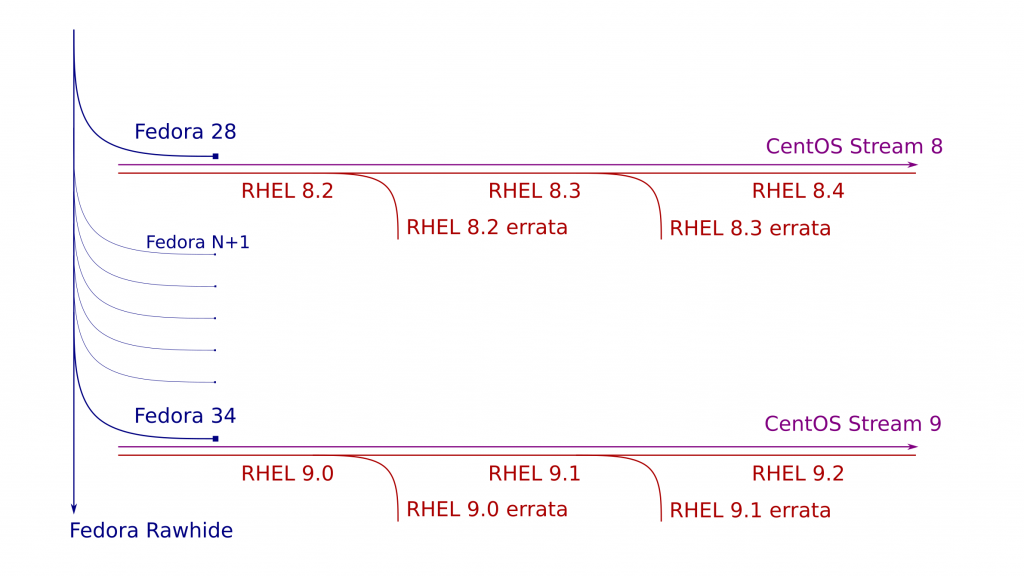
CentOS Stream is Continuous Delivery - blog.centos.org
また、パッケージの更新が行われるため Stream へのマイグレーションを本番に適用する前に開発環境で動作確認をした方が吉かと思います。
EC2 の本番環境以外を ARM に切り替えたら幸せなことしかありませんでした
この記事の下書きです。誤字、間違いが多いので ↓ を見たほうが良いです。
developers.cyberagent.co.jp
容量もファイル数が多い時にもっとも高速に別ディレクトリ(サーバー)にコピーする方法
TL;DR
脳死で xfsdump(dump) + nc(Netcat) 一択。
昔こんな記事で pigz + nc は速いって書いたけど xfsdump(dump) 使ったほうが速いんじゃないかと思ったので雑に比較してみた。
blog.luispc.com
環境
ファイルサイズ別で2パターン
632GB / 29450 ファイル
- 2C / 12GB / 1.2Gbps の sender / receiver
- 12C / 72GB / 7.2Gbps の sender / receiver
この環境はストレージもネットワーク経由でマウントされている。
ストレージ自体は 200MB/s がベストエフォート
コピー手法
個人的によく使われてるであろうよくある手法に xfsdump + nc を追加する。
xfsdump + nc
使い方
(sender) # time xfsdump - /dev/vdb | nc receiver 9999
(receiver) # nc -l 9999 | xfsrestore - /mnt/test
pigz + nc
使い方
(sender) # time tar cf - --use-compress-prog=pigz mysql | nc receiver 9999
(receiver) # nc -l 9999 | tar xvf - --use-compress-prog=pigz
rollbar を Go に導入してエラー監視をする
rollbar めちゃくちゃ便利です。安いし。
rollbar.com
main.go

rollbar.SetToken("")
rollbar.SetEnvironment(os.Getenv("SERVER_ENV"))
rollbar.SetCodeVersion("v2")
rollbar.SetServerHost(hostName)
rollbar.SetServerRoot("github.com/rluisr/easyuploader_api")
error を返すときは
handler.go

errorWithResponseInternalServer(c, "PreSigned", "failed to isPremiumJWT", "error", err)
return
error.go

func ErrorLogger(c *gin.Context, funcName, msg string, err error, level string) {
	rollbar.ErrorWithExtrasAndContext(c.Request.Context(), level, err, map[string]interface{}{"func_name": funcName, "client_ip": c.ClientIP(), "user_agent": c.Request.UserAgent()})
}

func errorWithResponseInternalServer(c *gin.Context, funcName, msg, resMsg string, err error) {
	ErrorLogger(c, funcName, msg, err, rollbar.CRIT)
	c.JSON(http.StatusInternalServerError, resMsg)
}
Traceback

interface で投げた内容は Occurrences で確認できる

rollbar と Vue.js で SourceMap を使ってエラー内容を確認する
rollbar めちゃくちゃ便利です。安いし。
rollbar.com
Vue.js で構築された Web アプリケーションのエラー内容を確認するときに
SourceMap が有効になっていないと追っかけることが難しいので SourceMap を有効にする。
必要な箇所だけ
webpack.base.config.js

...
module.exports = {
  mode: 'production',
  devtool: 'source-map',
  entry: './src/index.js',
  output: {
    path: utils.resolve('dist/'),
    filename: '[name]-[hash].js'
  },
...
}
webpack.prd.config.js

...
const RollbarSourceMapPlugin = require('rollbar-sourcemap-webpack-plugin')

module.exports = merge(baseConfig, {
  module: {},
  plugins: [
    new RollbarSourceMapPlugin({
      accessToken: '',
      version: process.env.GITHUB_SHA,
      publicPath: 'https://uploader.xzy.pw'
    })
  ]
})
こんな感じでどこでエラーになったかが分かる。

SourceMapが有効になっていないと、エラー文だけでどこでエラーか分からない。
アラートを一時的に無効にしたまま月日が経ちヒヤリハットしたことはないだろうか mfool というツールを作ってみた Mackerel 編
障害とかで一時的にアラートをミュートにしたら、戻すのを忘れてヒヤリハットしたことはないだろうか。
僕はあります。
こいつを使えば、
- working ステートになっていないホスト
- ミュートしているモニター
を Slack で教えてくれる。
Mackerel のモニターには時間指定でミュートすることが可能だけど、自分がしたとしても他人がそうするとは限らない。

世界最強の威力を誇る、チャンネル自体のミュートは API では拾えないっぽい。
ちなみに僕のヒヤリハットは Orchestrator という MySQL のフェイルオーバーを担うソフトウェアが載ったサーバーをずっとメンテナンスにしていたこと。
このツールを2プロジェクトで導入したらメンテナンス状態のままなやつがちらほら見つかった。
手動で確認してもいいけど、いちいちバックエンドの人にこれってなんでメンテナンスなんだっけって聞くのも面倒ですしね。
Firebase hosting で超簡単に障害時に自動でメンテナンスに振る
TL;DR
- メンテナンス情報を Firebase Cloud Fire Store から取得する
- uptimerobot の Webhook を使う
- Firebase functions で uptimerobot からの webhook を受け取る
- Firebase functions で Firebase Cloud Fire Store を書き換える
Firebase Cloud Fire Store を使う
firestore.js
import Firebase from 'firebase'
import 'firebase/firestore'

let config = {}

if (process.env.STAGE === 'staging' || process.env.STAGE === 'develop' || process.env.STAGE === 'local') {
  config = {
    apiKey: '',
    authDomain: 'easyuploader-web-stg.firebaseapp.com',
    databaseURL: 'https://easyuploader-web-stg.firebaseio.com',
    projectId: 'easyuploader-web-stg',
    storageBucket: 'easyuploader-web-stg.appspot.com',
    messagingSenderId: '1029528151776',
    appId: '1:1029528151776:web:ba68efd8003542a10fd285'
  }
}

if (process.env.STAGE === 'production') {
  config = {
    apiKey: '',
    authDomain: 'easyuploader-web.firebaseapp.com',
    databaseURL: 'https://easyuploader-web.firebaseio.com',
    projectId: 'easyuploader-web',
    storageBucket: 'easyuploader-web.appspot.com',
    messagingSenderId: '940122739680',
    appId: '1:940122739680:web:8b6d89ef3d3ac20a841185'
  }
}

if (process.env.STAGE === 'free') {
  config = {
    apiKey: '',
    authDomain: 'easyuploader-free.firebaseapp.com',
    databaseURL: 'https://easyuploader-free.firebaseio.com',
    projectId: 'easyuploader-free',
    storageBucket: 'easyuploader-free.appspot.com',
    messagingSenderId: '816447004806',
    appId: '1:816447004806:web:4b3ca4d405e8cfa66bb107',
    measurementId: 'G-JGTVDZE5MY'
  }
}

const firebaseApp = Firebase.initializeApp(config, 'exercise-vue')
const firestore = firebaseApp.firestore()

export default firestore
App.vue
<script>
import firestore from './firestore'
const initRef = firestore.collection('init')

export default {
  name: 'EasyUploader',
  created () {
    initRef.get().then(querySnapshot => {
      querySnapshot.forEach(doc => {
        const initObj = doc.data()
        this.initObj.isMaintenance = initObj.maintenance
        this.initObj.message = '【お知らせ】' + initObj.message
      })
    })
  }
}
</script>
uptimerobot webhook
uptimerbot は無料で使える死活監視 SaaS で、アラートに webhook が使える。
そして、指定した URL にクエリパラメータとして下記の情報が付与される
*monitorID* (the ID of the monitor)
*monitorURL* (the URL of the monitor)
*monitorFriendlyName* (the friendly name of the monitor)
*alertType* (1: down, 2: up, 3: SSL expiry notification)
*alertTypeFriendlyName* (Down or Up)
*alertDetails* (any info regarding the alert -if exists-)
*alertDuration* (in seconds and only for up events)
*alertDateTime* (in Unix timestamp)
*monitorAlertContacts* (the alert contacts associated with the alert in the format of 457;2;john@doe.com -alertContactID;alertContactType, alertContactValue)
*sslExpiryDate* (only for SSL expiry notifications)
*sslExpiryDaysLeft* (only for SSL expiry notifications)
Firebase Functions
個人開発の雑書きですが、やりたいことはなんとなく分かると思います。
const functions = require('firebase-functions')

const admin = require('firebase-admin')
admin.initializeApp(functions.config().firebase)

const firestore = admin.firestore()

// eslint-disable-next-line consistent-return
exports.uptimerobot = functions.https.onRequest((req, res) => {
  const project = process.env.GCLOUD_PROJECT
  const alertType = req.query.alertType
  const monitorID = req.query.monitorID

  console.log(`project: ${project}`)
  console.log(`alertType: ${alertType}`)
  console.log(`monitorID: ${monitorID}`)

  const docGetFileProblem = {
    maintenance: false,
    message: '現在ファイルの参照ができない問題が発生しています'
  }
  const docGetFileSolved = {
    maintenance: false,
    message: ''
  }
  const docBasicFunctionProblem = {
    maintenance: true,
    message: '現在アップロードすることができません'
  }
  const docBasicFunctionSolved = {
    maintenance: false,
    message: ''
  }
  const docUploadProblem = {
    maintenance: true,
    message: ''
  }
  const docUploadSolved = {
    maintenance: false,
    message: ''
  }

  let docID
  // staging
  if (project === 'easyuploader-web-stg') {
    docID = 'RA0EBeoUw0jZwxV9mGPR'
  }
  // free
  if (project === 'easyuploader-free') {
    docID = 'hwWuR9Q5Gs7KJ9MKRrkr'
  }
  // production
  if (project === 'easyuploader-web') {
    docID = 'NKqRdtrdiNBJSrYmQT5b'
  }

  const initRef = firestore.collection('init').doc(docID)

  // down
  if (alertType === '1') {
    // ファイル参照
    if (monitorID === '784159295') {
      return initRef.update(docGetFileProblem)
        // eslint-disable-next-line promise/always-return
        .then(() => {
          res.status(200).send('ok')
        })
        .catch((error) => {
          console.error('Error updating document: ', error)
        })
    }
    // 基本機能
    if (monitorID === '783009626') {
      return initRef.update(docBasicFunctionProblem)
        // eslint-disable-next-line promise/always-return
        .then(() => {
          res.status(200).send('ok')
        })
        .catch((error) => {
          console.error('Error updating document: ', error)
        })
    }
    // アップロード
    if (monitorID === '784152180') {
      return initRef.update(docUploadProblem)
        // eslint-disable-next-line promise/always-return
        .then(() => {
          res.status(200).send('ok')
        })
        .catch((error) => {
          console.error('Error updating document: ', error)
        })
    }
  }

  // up
  if (alertType === '2') {
    // ファイル参照
    if (monitorID === '784159295') {
      return initRef.update(docGetFileSolved)
        // eslint-disable-next-line promise/always-return
        .then(() => {
          res.status(200).send('ok')
        })
        .catch((error) => {
          console.error('Error updating document: ', error)
        })
    }
    // 基本機能
    if (monitorID === '783009626') {
      return initRef.update(docBasicFunctionSolved)
        // eslint-disable-next-line promise/always-return
        .then(() => {
          res.status(200).send('ok')
        })
        .catch((error) => {
          console.error('Error updating document: ', error)
        })
    }
    // アップロード
    if (monitorID === '784152180') {
      return initRef.update(docUploadSolved)
        // eslint-disable-next-line promise/always-return
        .then(() => {
          res.status(200).send('ok')
        })
        .catch((error) => {
          console.error('Error updating document: ', error)
        })
    }
  }
})
個人だけど NURO Biz 契約してみた
詐欺タイトルです。
フレッツ光の光配線方式はマンションと NTT の都合で何でか分からんけど開通ができなかった。
前のマンションのオーナーが運良く NURO を引いていたので NURO Biz にした。
NURO Biz にしたのは固定 IP が必要だったから。
個人で NURO Biz を契約する方法を紹介します。
まずは会社を作る
合同会社で良いです
HP より申し込む
申し込んでから開通まで2ヶ月ちょっと。
コロナの影響もあるかは不明だけど、このご時世じゃなかったらもうちょい早かったかも?
終わり
Nuro Biz さいっきょ https://t.co/s7pKkENZlb
— るいす (@rarirureluis) 2020年9月14日
NURO Biz は ONU の LAN1 に 1Gbps / LAN2 に 1Gbps と合計 2Gbps が使える。
動的 IP は ER-4 でデスクトップとか、WiFi に
固定 IP は ER-8 でサーバーに使ってます。
今まで VDSL で 80Mbps とかだったから幸せになれました。(月2万円)
InnoDB Cluster が Split-Brain で死んだ時
 MySQL  db03:33060+ ssl  JS > c.status()
{
    "clusterName": "main",
    "defaultReplicaSet": {
        "name": "default",
        "primary": "db03.luis.local:3306",
        "ssl": "REQUIRED",
        "status": "NO_QUORUM",
        "statusText": "Cluster has no quorum as visible from 'db03.luis.local:3306' and cannot process write transactions. 2 members are not active",
        "topology": {
            "db01.luis.local:3306": {
                "address": "db01.luis.local:3306",
                "mode": "R/O",
                "readReplicas": {},
                "role": "HA",
                "status": "(MISSING)"
            },
            "db02.luis.local:3306": {
                "address": "db02.luis.local:3306",
                "mode": "R/O",
                "readReplicas": {},
                "role": "HA",
                "status": "UNREACHABLE",
                "version": "8.0.21"
            },
            "db03.luis.local:3306": {
                "address": "db03.luis.local:3306",
                "mode": "R/O",
                "readReplicas": {},
                "replicationLag": null,
                "role": "HA",
                "status": "ONLINE",
                "version": "8.0.21"
            }
        },
        "topologyMode": "Single-Primary"
    },
    "groupInformationSourceMember": "db03.luis.local:3306"
}
rejoin しようが何しようが有効な quorum がないためエラーになる。
 MySQL  db03:33060+ ssl  JS > c.rejoinInstance('db03.luis.local:3306')
Cluster.rejoinInstance: There is no quorum to perform the operation (RuntimeError)
有効なノードが1台居るから(db03.luis.local:3306)ここを元に Cluster を再作成する。
 MySQL  db03:33060+ ssl  JS > c.forceQuorumUsingPartitionOf('root@db03.luis.local:3306', 'password')
Restoring cluster 'main' from loss of quorum, by using the partition composed of [db03.luis.local:3306]

Restoring the InnoDB cluster ...

The InnoDB cluster was successfully restored using the partition from the instance 'root@db03.luis.local:3306'.

WARNING: To avoid a split-brain scenario, ensure that all other members of the cluster are removed or joined back to the group that was restored.
稀に失敗することがあるけど数分後待つと通る(もしかして、status: UNREACHABLE が悪い?)
数分待って通ったのは db02.luis.local:3306 への疎通が通ったからかな?
 MySQL  db03:33060+ ssl  JS > c.forceQuorumUsingPartitionOf('root@db03.luis.local:3306', 'password')
Restoring cluster 'main' from loss of quorum, by using the partition composed of [db03.luis.local:3306]

Restoring the InnoDB cluster ...

Cluster.forceQuorumUsingPartitionOf: db03.luis.local:3306: Variable 'group_replication_force_members' can't be set to the value of 'db03.luis.local:33061' (RuntimeError)
NO_QUORUM は解決できた
 MySQL  db03:33060+ ssl  JS > c.status()
{
    "clusterName": "main",
    "defaultReplicaSet": {
        "name": "default",
        "primary": "db03.luis.local:3306",
        "ssl": "REQUIRED",
        "status": "OK_NO_TOLERANCE",
        "statusText": "Cluster is NOT tolerant to any failures. 2 members are not active",
        "topology": {
            "db01.luis.local:3306": {
                "address": "db01.luis.local:3306",
                "mode": "R/O",
                "readReplicas": {},
                "role": "HA",
                "status": "(MISSING)"
            },
            "db02.luis.local:3306": {
                "address": "db02.luis.local:3306",
                "mode": "R/O",
                "readReplicas": {},
                "role": "HA",
                "status": "(MISSING)"
            },
            "db03.luis.local:3306": {
                "address": "db03.luis.local:3306",
                "mode": "R/W",
                "readReplicas": {},
                "replicationLag": null,
                "role": "HA",
                "status": "ONLINE",
                "version": "8.0.21"
            }
        },
        "topologyMode": "Single-Primary"
    },
    "groupInformationSourceMember": "db03.luis.local:3306"
}
あとは MISSING なノードを rejoin させる
 MySQL  db03:33060+ ssl  JS > c.rejoinInstance('root@db01.luis.local')
Rejoining the instance to the InnoDB cluster. Depending on the original
problem that made the instance unavailable, the rejoin operation might not be
successful and further manual steps will be needed to fix the underlying
problem.

Please monitor the output of the rejoin operation and take necessary action if
the instance cannot rejoin.

Rejoining instance to the cluster ...

The instance 'db01.luis.local' was successfully rejoined on the cluster.

 MySQL  db03:33060+ ssl  JS > c.rejoinInstance('root@db02.luis.local')
Rejoining the instance to the InnoDB cluster. Depending on the original
problem that made the instance unavailable, the rejoin operation might not be
successful and further manual steps will be needed to fix the underlying
problem.

Please monitor the output of the rejoin operation and take necessary action if
the instance cannot rejoin.

Rejoining instance to the cluster ...

The instance 'db02.luis.local' was successfully rejoined on the cluster.

 MySQL  db03:33060+ ssl  JS > c.status()
{
    "clusterName": "main",
    "defaultReplicaSet": {
        "name": "default",
        "primary": "db03.luis.local:3306",
        "ssl": "REQUIRED",
        "status": "OK",
        "statusText": "Cluster is ONLINE and can tolerate up to ONE failure.",
        "topology": {
            "db01.luis.local:3306": {
                "address": "db01.luis.local:3306",
                "mode": "R/O",
                "readReplicas": {},
                "recovery": {
                    "state": "ON"
                },
                "recoveryStatusText": "Distributed recovery in progress",
                "role": "HA",
                "status": "RECOVERING",
                "version": "8.0.21"
            },
            "db02.luis.local:3306": {
                "address": "db02.luis.local:3306",
                "mode": "R/O",
                "readReplicas": {},
                "recovery": {
                    "cloneStartTime": "2020-04-11 12:37:09.240",
                    "cloneState": "Completed",
                    "currentStage": "RECOVERY",
                    "currentStageState": "Completed"
                },
                "recoveryStatusText": "Cloning in progress",
                "role": "HA",
                "status": "RECOVERING",
                "version": "8.0.21"
            },
            "db03.luis.local:3306": {
                "address": "db03.luis.local:3306",
                "mode": "R/W",
                "readReplicas": {},
                "replicationLag": null,
                "role": "HA",
                "status": "ONLINE",
                "version": "8.0.21"
            }
        },
        "topologyMode": "Single-Primary"
    },
    "groupInformationSourceMember": "db03.luis.local:3306"
}
